Month: September 2012

  • QR Code – The Quick Response Codes

    QR Code – The Quick Response Codes

    QR codes as the name suggests, are much quicker and efficient than our traditional 1 dimension Barcodes. It stores data by the arrangements of dots. For technical reference, visit the Wikipedia page which explains it beautifully.

    Let’s see, how to create such a QR code for our own data. There are several software available on internet. But most of them are trail versions. We need simple, free and an efficient one. FREE QR CREATOR from smp-soft is a great choice for Windows users. It is absolutely free and can be used to  create Micro QR codes as well as standard ones. Micro QR codes are smaller version of normal QR codes where the area of code available is limited. It has more data density than standard ones.
    A version 40 QR code can store up to 1832 characters! Which is hundreds of times more data density than Barcodes.

    FREE QR Creator for Windows

    Free QRCode creator screenshot

    Enter anything you want in the DATA box and the software automatically converts it into corresponding QR code. The generated code can be saved as jpg, bmp, png, gif, tiff or emf. It also provides the option to change the background, foreground and to add border for the code. The border can be added either at ‘top and bottom’ or at all four sides. Moreover you can copy the generated image to clipboard and then can be pasted to Paint or Photoshop like image editors.

    Online QR Code Generators

    QR Code Readers

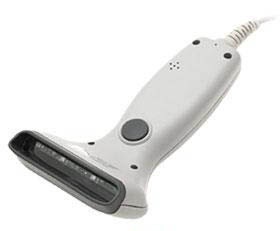
    QR Code Reader Device
    The QR code can be decoded using smartphone applications or dedicated QR code readers. There are several apps available for our smartphones. Currently, almost all major OS platforms will provide QR code readers. QR Code readers (hardware) cost more than barcode readers since it requires a 2 Dimensional scanner.
    Android QR Code Scanner Result
    Download the perfect Barcode/QR Code Reader for Android:-  BarcodeScanner for Android. This app works very well and is free. For other operating systems, search on your app market using ‘QR code reader’ or just with ‘QR code’ to download QR Code reader application.
  • Using Barcode Reader for your C++ Program

    Using Barcode Reader for your C++ Program

    As you might have heard, Bracode readers are special input devices for computers to read barcode. Barcode reader first scan the barcode using a light beam( usually a laser beam ) and analyze the width and distance between the bars. After successful scanning it convert the data into ASCII code which can be decoded by our computer. Simply we can say, a ps/2 barcode reader is same as that of a keyboard. Both generates the same ASCII code for representing an alphanumeric character. For more about ascii, read my article.

    A ps/2 barcode readrer is the simplest at the same time more efficient for general purposes. In C++ the header file iostream.h defines cin, cout commands for standard input and output operations respectively. As default, keyboard is the standard input device. Since our ps/2 barcode reader can act as an alternative keyboard by reading and sending ASCII codes to the computer, surely we can use our cin command for data input.

    I hope it is clear for you now. For further study, Let’s just analyze the below situation. Imagine you have a barcode containing data ‘1001’. When you scan it with barcode reader it generates a signal in ASCII code and send it to computer in the same way when you press ‘1001’ using your keyboard. The computer can’t distinguish from where the data came. So further processes can be programmed as our intentions.

    There are a lot of type barcode readers. For general purposes like supermarket, library programs, i recommend ps/2 barcode reader which can be used along with our keyboard. let’s just take a sample c++ program to read from barcode reader.

    #include<iostream>
    #include<conio.h>
    using namespace std;
    void main() {
      int a = 0;
      //Scan a barcode (simple barcode containing a number ). Don't use keyboard  
      cin >> a;
      if (a) {
        cout << "n Data Received !n" << "Barcode is :" << a;
      }
      return;
    }
    

    Suggested Read : The Quick Response Codes