In this post, I am going to introduce an android application for teachers. Android is the ideal platform for developing such an application due to the wide variety of devices it supports. This Android app for teachers support basic functionalities such as adding student to each class/department, save notes, make schedules for classes etc. It also provides a CGPA (Cumulative Grade Point Average) calculator that basically calculate grade point average from the given grade points.
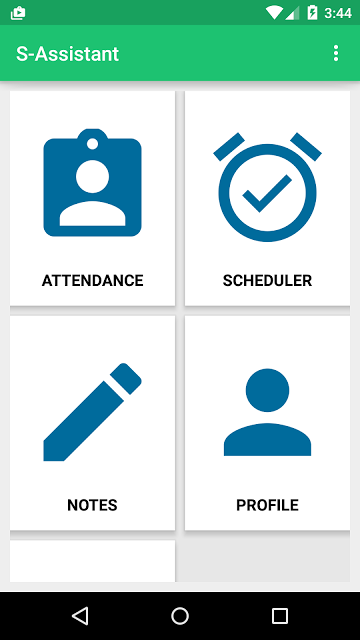
The First Activity Contains a Grid view that provides the connection to basic activities. The Attendance module is added to take attendance and store it in a database. The scheduler is basically used to schedule a particular event so that teachers won’t be needing another application as reminder.
Notes provides an easier way to save notes easily and quickly. Notes can also be associated with a subject so that it will be popped up when the teacher takes attendance for that subject.
Profile Module provides support to view and edit student data, along with activity to add new students.
Features Available
- Take attendance and keep them class wise
- Add New student. View each student’s attendance separately
- Edit Student/Attendance later
- Save notes subject wise
- Automatic notification about notes available when the teacher takes attendance
- Schedule classes
- CGPA calculator
- Simple and Material designed interface
Database Design
Simple sqlite database is used to store data through different tables.
 import android.app.Activity;
 import android.database.Cursor;
 import android.database.sqlite.SQLiteDatabase;
 import android.util.Log;
 import android.widget.Toast;
 public class databaseHandler {
   SQLiteDatabase database;
   Activity activity;
   public databaseHandler(Activity activity) {
     this.activity = activity;
     database = activity.openOrCreateDatabase("ASSIST", activity.MODE_PRIVATE, null);
     createTable();
   }
   public void createTable()
   {
     try {
       String qu = "CREATE TABLE IF NOT EXISTS STUDENT(name varchar(1000)," +
           "cl varchar(100), " +
           "regno varchar(100) primary key, contact varchar(100),roll integer);";
       database.execSQL(qu);
     }catch (Exception e)
     {
       Toast.makeText(activity,"Error Occured for create table",Toast.LENGTH_LONG).show();
     }
     try {
       String qu = "CREATE TABLE IF NOT EXISTS ATTENDANCE(datex date," +
           "hour int, " +
           "register varchar(100) ,isPresent boolean);";
       database.execSQL(qu);
     }catch (Exception e)
     {
       Toast.makeText(activity,"Error Occured for create table",Toast.LENGTH_LONG).show();
     }
     try {
       String qu = "CREATE TABLE IF NOT EXISTS NOTES(title varchar(100) not null," +
           "body varchar(10000), cls varchar(1000), sub varchar(1000) ,datex TIMESTAMP default CURRENT_TIMESTAMP);";
       database.execSQL(qu);
     }catch (Exception e)
     {
       Toast.makeText(activity,"Error Occured for create table",Toast.LENGTH_LONG).show();
     }
     try {
       String qu = "CREATE TABLE IF NOT EXISTS SCHEDULE(cl varchar(100),subject varchar(1000)," +
           "timex time, day_week varchar(100));";
       database.execSQL(qu);
     }catch (Exception e)
     {
       Toast.makeText(activity,"Error Occured for create table",Toast.LENGTH_LONG).show();
     }
   }
   public boolean execAction(String qu)
   {
     Log.i("databaseHandler", qu);
     try {
       database.execSQL(qu);
     }catch (Exception e)
     {
       Log.e("databaseHandler", qu);
       Toast.makeText(activity,"Error Occured for execAction",Toast.LENGTH_LONG).show();
       return false;
     }
     return true;
   }
   Cursor execQuery(String qu)
   {
     try {
       return database.rawQuery(qu,null);
     }catch (Exception e)
     {
       Log.e("databaseHandler", qu);
       Toast.makeText(activity,"Error Occured for execAction",Toast.LENGTH_LONG).show();
     }
     return null;
   }
 }
database = activity.openOrCreateDatabase("ASSIST", activity.MODE_PRIVATE, null);
The code is used to create or open the database in private mode. After opening the mysqli database all normal mysql operations can be performed on the database.
Main Activity
 <?xml version="1.0" encoding="utf-8"?>
 <LinearLayout xmlns:android="http://schemas.android.com/apk/res/android"
   android:orientation="vertical" android:layout_width="match_parent"
   android:layout_height="match_parent"
   android:padding="10dp"
   >
   <GridView
     android:layout_width="match_parent"
     android:numColumns="2"
     android:id="@+id/grid"
     android:background="#e7e7e7"
     android:columnWidth="150dp"
     android:gravity="center"
     android:verticalSpacing="10dp"
     android:horizontalSpacing="10dp"
     android:stretchMode="columnWidth"
     android:layout_height="match_parent">
   </GridView>
 </ LinearLayout >
The Grid Layout has both width and height and Match Parent so that it will fit into the whole screen.
BaseActivity.java
Now let’s understand the code for the first activity.
 import android.app.Activity;
 import android.content.Intent;
 import android.database.Cursor;
 import android.database.sqlite.SQLiteDatabase;
 import android.support.design.widget.FloatingActionButton;
 import android.support.design.widget.Snackbar;
 import android.support.v7.app.AppCompatActivity;
 import android.os.Bundle;
 import android.util.Log;
 import android.view.Menu;
 import android.view.MenuInflater;
 import android.view.MenuItem;
 import android.view.View;
 import android.widget.Button;
 import android.widget.EditText;
 import android.widget.GridView;
 import java.util.ArrayList;

 public class AppBase extends AppCompatActivity {
   private ArrayList<String> basicFields;
   private gridAdapter adapter;
   public static ArrayList<String> divisions ;
   private GridView gridView;
   public static databaseHandler handler;
   public static Activity activity;
   @Override
   public boolean onCreateOptionsMenu(Menu menu) {
     super.onCreateOptionsMenu(menu);
     MenuInflater inflater = getMenuInflater();
     inflater.inflate(R.menu.mai_menu, menu);
     return true;
   }
   @Override
   protected void onCreate(Bundle savedInstanceState) {
     super.onCreate(savedInstanceState);
     setContentView(R.layout.base_layout);
     basicFields = new ArrayList<>();
     handler = new databaseHandler(this);
     activity = this;
     getSupportActionBar().show();
     divisions = new ArrayList();
     divisions.add("S1 COMPUTER SCIENCE");
     divisions.add("S2 COMPUTER SCIENCE");
     divisions.add("S3 COMPUTER SCIENCE");
     divisions.add("S4 COMPUTER SCIENCE");
     divisions.add("S5 COMPUTER SCIENCE");
     divisions.add("S6 COMPUTER SCIENCE");
     divisions.add("S7 COMPUTER SCIENCE");
     gridView = (GridView)findViewById(R.id.grid);
     basicFields.add("ATTENDANCE");
     basicFields.add("SCHEDULER");
     basicFields.add("NOTES");
     basicFields.add("PROFILE");
     basicFields.add("CGPA CALCULATOR");
     adapter = new gridAdapter(this,basicFields);
     gridView.setAdapter(adapter);
   }
   public void loadSettings(MenuItem item) {
     Intent launchIntent = new Intent(this,SettingsActivity.class);
     startActivity(launchIntent);
   }
   public void loadAbout(MenuItem item) {
     Intent launchIntent = new Intent(this,About.class);
     startActivity(launchIntent);
   }
 }
From the onCreate() method, we have inflated the xml layout. The database handler is defined as a public static variable so that it can be accessed from all other activities without the need of declaration and initialization. I have used a custom adapter for the grid view called gridAdapter.
adapter = new gridAdapter(this,basicFields);gridView.setAdapter(adapter); Custom Grid Adapter
 import android.app.Activity;
 import android.app.AlertDialog;
 import android.app.Dialog;
 import android.app.DialogFragment;
 import android.app.FragmentManager;
 import android.app.Notification;
 import android.app.NotificationManager;
 import android.app.PendingIntent;
 import android.content.DialogInterface;
 import android.content.Intent;
 import android.content.SharedPreferences;
 import android.database.Cursor;
 import android.net.Uri;
 import android.os.Bundle;
 import android.preference.PreferenceManager;
 import android.provider.Settings;
 import android.support.v4.app.NotificationCompat;
 import android.util.Log;
 import android.view.LayoutInflater;
 import android.view.View;
 import android.view.ViewGroup;
 import android.view.animation.Animation;
 import android.view.animation.ScaleAnimation;
 import android.widget.ArrayAdapter;
 import android.widget.BaseAdapter;
 import android.widget.DatePicker;
 import android.widget.EditText;
 import android.widget.ImageView;
 import android.widget.Spinner;
 import android.widget.TextView;
 import android.widget.Toast;
 import java.util.ArrayList;
 import java.util.StringTokenizer;
 public class GridAdapter extends BaseAdapter{
   private ArrayList<String> names;
   public static Activity activity;
   public gridAdapter(Activity activity, ArrayList names) {
     this.activity = activity;
     this.names = names;
   }
   @Override
   public int getCount() {
     return names.size();
   }
   @Override
   public Object getItem(int position) {
     return names.get(position);
   }
   @Override
   public long getItemId(int position) {
     return position;
   }
   @Override
   public View getView(int position, View v, ViewGroup parent) {
     if (v == null) {
       LayoutInflater vi = LayoutInflater.from(activity);
       v = vi.inflate(R.layout.grid_layout, null);
     }
     TextView textView = (TextView)v.findViewById(R.id.namePlacer);
     ImageView imageView = (ImageView)v.findViewById(R.id.imageHolder);
     if(names.get(position).toString().equals("ATTENDANCE"))
     {
       imageView.setImageResource(R.drawable.ic_attendance);
       v.setOnClickListener(new View.OnClickListener() {
         @Override
         public void onClick(View v) {
           FragmentManager fm = activity.getFragmentManager();
           createRequest request = new createRequest();
           request.show(fm,"Select");
         }
       });
     }else if(names.get(position).toString().equals("SCHEDULER"))
     {
       imageView.setImageResource(R.drawable.ic_schedule);
       v.setOnClickListener(new View.OnClickListener() {
         @Override
         public void onClick(View v) {
           Intent launchinIntent = new Intent(activity, scheduler.class);
           activity.startActivity(launchinIntent);
         }
       });
     }else if(names.get(position).toString().equals("NOTES"))
     {
       imageView.setImageResource(R.drawable.ic_notes);
       v.setOnClickListener(new View.OnClickListener() {
         @Override
         public void onClick(View v) {
           Intent launchinIntent = new Intent(activity, noteActivity.class);
           activity.startActivity(launchinIntent);
         }
       });
     }else if(names.get(position).toString().equals("PROFILE"))
     {
       imageView.setImageResource(R.drawable.ic_profile);
       v.setOnClickListener(new View.OnClickListener() {
         @Override
         public void onClick(View v) {
           Intent launchinIntent = new Intent(activity, profile_activity.class);
           activity.startActivity(launchinIntent);
         }
       });
     }
     else if(names.get(position).toString().equals("CGPA CALCULATOR"))
     {
       imageView.setImageResource(R.drawable.ic_cgpa);
       v.setOnClickListener(new View.OnClickListener() {
         @Override
         public void onClick(View v) {
           Intent launchinIntent = new Intent(activity, cgpa_activity.class);
           activity.startActivity(launchinIntent);
         }
       });
     }
     textView.setText(names.get(position).toString());
     return v;
   }
   public static class createRequest extends DialogFragment {
     @Override
     public void onCreate(Bundle savedInstanceState) {
       super.onCreate(savedInstanceState);
     }
     @Override
     public Dialog onCreateDialog(Bundle savedInstanceState) {
       AlertDialog.Builder builder = new AlertDialog.Builder(getActivity());
       // Get the layout inflater
       LayoutInflater inflater = getActivity().getLayoutInflater();
       final View v = inflater.inflate(R.layout.pick_period, null);
       final DatePicker datePicker = (DatePicker) v.findViewById(R.id.datePicker);
       final EditText hour = (EditText)v.findViewById(R.id.periodID);
       final Spinner spn = (Spinner) v.findViewById(R.id.spinnerSubject);
       String qu = "SELECT DISTINCT sub FROM NOTES";
       ArrayList<String> subs = new ArrayList<>();
       subs.add("Not Specified");
       Cursor cr = AppBase.handler.execQuery(qu);
       if(cr!=null)
       {
         cr.moveToFirst();
         while(!cr.isAfterLast()) {
           subs.add(cr.getString(0));
           Log.d("gridAdapter.class", "Cached " + cr.getString(0));
           cr.moveToNext();
         }
       }else
         Log.d("gridAdapter.class", "No SUBS" + cr.getString(0));
       ArrayAdapter<String> adapterSpinner = new ArrayAdapter<String>(activity, android.R.layout.simple_spinner_dropdown_item, subs);
       assert spn != null;
       spn.setAdapter(adapterSpinner);
       builder.setView(v)
           // Add action buttons
           .setPositiveButton("Enter", new DialogInterface.OnClickListener() {
             @Override
             public void onClick(DialogInterface dialog, int id) {
               int day = datePicker.getDayOfMonth();
               int month = datePicker.getMonth() + 1;
               int year = datePicker.getYear();
               String date = year + "-" + month + "-" + day;
               String subject = spn.getSelectedItem().toString();
               String qx = "SELECT title FROM NOTES where sub = '" + subject + "'";
               Cursor cr = AppBase.handler.execQuery(qx);
               String subnames = "";
               if(cr!=null)
               {
                 cr.moveToFirst();
                 while(!cr.isAfterLast()) {
                   subnames += (cr.getString(0)) + "n";
                   cr.moveToNext();
                 }
               }
               makeNotification(subnames);
               Cursor cursor = AppBase.handler.execQuery("SELECT * FROM ATTENDANCE WHERE datex = '" +
                   date +"' AND hour = " + hour.getText() + ";");
               if(cursor==null||cursor.getCount()==0)
               {
                 Intent launchinIntent = new Intent(AppBase.activity, attendanceActivity.class);
                 launchinIntent.putExtra("DATE", date);
                 launchinIntent.putExtra("PERIOD", hour.getText().toString());
                 AppBase.activity.startActivity(launchinIntent);
               }else {
                 Toast.makeText(getActivity(),"Period Already Added",Toast.LENGTH_LONG).show();
               }
             }
           })
           .setNegativeButton("Cancel", new DialogInterface.OnClickListener() {
             public void onClick(DialogInterface dialog, int id) {
               dialog.dismiss();
             }
           });
       return builder.create();
     }
   }
   public static void makeNotification(String userIntrouble) {
     Log.d("NOTIFICATION","Building..........");
     Intent notificationIntent = new Intent(activity.getApplicationContext(), noteActivity.class);
     PendingIntent pIntent = PendingIntent.getActivity(activity, 0, notificationIntent,
         0);
     SharedPreferences sharedPrefs = PreferenceManager.getDefaultSharedPreferences(activity.getBaseContext());
     Uri ring = Uri.parse(sharedPrefs.getString("Notification_Sound", Settings.System.DEFAULT_RINGTONE_URI.toString()));
     NotificationCompat.Builder builder = new NotificationCompat.Builder(activity.getBaseContext())
         .setTicker("Ticker Title").setContentTitle("Notes Are Available For this subject")
         .setSmallIcon(R.drawable.ic_notes)
         .setStyle(new NotificationCompat.BigTextStyle().bigText(userIntrouble))
         .setContentIntent(pIntent)
         .setSound(ring);
     Notification noti = builder.build();
     noti.contentIntent = pIntent;
     noti.flags = Notification.FLAG_AUTO_CANCEL;
     NotificationManager notificationManager = (NotificationManager) activity.getSystemService(activity.NOTIFICATION_SERVICE);
     notificationManager.notify(0, noti);
   }
 }
The custom adapter GridAdapter extends Android’s BaseAdapter and implements its methods. In the getView method, we have inflated both the title and ImageView using an if-else case.
Attendance Activity Create Dialog

Create request dialog is created when the user clicks on Attendance view in the Grid Layout. An onClickListener is added for the view v in the above code.
The dialog takes the date and hour(period) along with subject which is to be taken by the teacher. A notification module is added which will notify the teacher about the notes available for that particular subject once they click on the Enter option. Moreover clicking the Enter will launch new Activity called AttendanceActivity.
 Intent launchinIntent = new Intent(AppBase.activity, attendanceActivity.class);
 launchinIntent.putExtra("DATE", date);
 launchinIntent.putExtra("PERIOD", hour.getText().toString());
AppBase.activity.startActivity(launchinIntent); Settings Activity
Setting activity provides option to clear application data. It wipes all the data from the database once selected.
The following data can be cleared.
- Schedule created
- Attendance data
- Notes saved
- Student Info

pref_general.xml
<PreferenceScreen xmlns:android="http://schemas.android.com/apk/res/android">
 <Preference
   android:title="Clear Schedule data"
   android:summary="Clear all schedules"
   android:key="clear_schedule"/>
   <Preference
     android:title="Clear Attendance data"
     android:summary="Clear all Attendance Data"
     android:key="clear_attendance"/>
   <Preference
     android:title="Clear Notes data"
     android:summary="Clear all Notes Data"
     android:key="clear_notes"/>
   <Preference
     android:title="Clear Student data"
     android:summary="Clear all Student Data"
     android:key="clear_student"/>
</PreferenceScreen> addPreferencesFromResource(R.xml.pref_general)Then for each preference entry event handler is provided using the code.
 Preference myPref = findPreference("clear_schedule");
     myPref.setOnPreferenceClickListener(new Preference.OnPreferenceClickListener() {
       public boolean onPreferenceClick(Preference preference) {
          //DO ACTION HERE
 }
That’s all about the first activity of S-Assistant from Android app for teachers. There are many other modules in the program. I feel it is not a good idea to explain them all. Get the project source code from the following link.
Screenshots:-


Which api is used in this app ?
could you create an .apk file please. I would like to use it on my mobile
can you explain a bit more about how you connected your database please. I am trying to make an app with web hosting and how to use the SQL database.
thanks
can you make a tutorials like you have created in javaFX library management system …
can you please give me the php codes
Error:(1, 0) Plugin with id ‘com.android.application’ not found.
i am also having the same problem.
have you found the solution of this problem ?
add plugin in your gradle
I’ve added plugins too, but now it is asking to use gradle 1.0 and i have 2.3
Did you solve your error?
Hi Can you please share PHP codes
i need the link to download this app
can you please provide me the procedure for executing the code.