
There are 118 elements in our periodic table, which is the base of science. Each element has its own characteristic properties depending upon its electronic configuration. So finding electronic configuration of elements is very important.
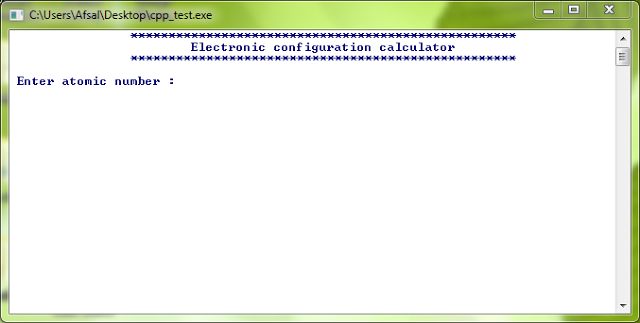
Here is a C++ program for a sub shell electronic configuration calculator. By just typing the atomic number you can get the sub shell electronic configuration of the element. The sub shells are arranged in the increasing order of its energy. This is a windows console application. You can use visual C++ compiler to compile this program. You can download the C++ file and console .exe application from the link below.
Subscribe for more cool programs and source codes.
————————————————————————————————————
#include<iostream>
using namespace std;
void main() //Starting_main_function
{ system(“color f1”);
cout<<“tt***************************************************n”;
cout<<“tttElectronic configuration calculatorn”;
cout<<“tt***************************************************n”;
int n, s1, s2, p2, s3, p3, s4, d3, p4, s5, d4, p5, s6, f4, d5, p6, s7, f5, d6, p7;
cout<<“n Enter atomic number :”;
cin>>n;
if (n<=2)
s1=n;
else if (n>2)
s1=2;
if (n<=4 && n>=2)
s2=n-2;
else if (n<2)
s2=0;
else
if (n>4)
s2=2;
if (n<=10 && n>=4)
p2=(n-4);
else if (n<4)
p2=0;
else
if (n>10)
p2=6 ;
if (n<=12 && n>=10)
s3=n-10;
else if (n<10)
s3=0;
else
if (n>12)
s3=2;
if (n<=18 && n>=12)
p3=n-12;
else if (n<12)
p3=0;
else
if (n>18)
p3=6;
if (n<=20 && n>=18)
s4=n-18;
else if (n<18)
s4=0;
else
if(n>20)
s4=2;
if (n<=30 && n>=20)
d3=n-20;
else if (n<20)
d3=0;
else
if (n>30)
d3=10;
if (n<=36 && n>=30)
p4=n-30;
else if (n<30)
p4=0;
else
if(n>36)
p4=6;
if (n<=38 && n>=36)
s5=n-36;
else if (n<36)
s5=0;
else
if(n>38)
s5=2;
if (n<=48 && n>=38)
d4=n-38;
else if (n<38)
d4=0;
else
d4=10;
if (n<=54 && n>=48)
p5=n-48;
else if (n<48)
p5=0;
else
if (n>54)
p5=6;
if (n<=56 && n>=54)
s6=n-54;
else if (n<54)
s6=0;
else
if (n>56)
s6=2;
if (n<=70 && n>=56)
f4=n-56;
else if (n<56)
f4=0;
else
if(n>70)
f4=14;
if (n<=80 && n>=70)
d5=n-70;
else if (n<70)
d5=0;
else
if (n>80)
d5=10;
if (n<=86 && n>=80)
p6=n-80;
else if (n<80)
p6=0;
else
p6=6;
if (n<=88 && n>=86)
s7=n-86;
else if (n<86)
s7=0;
else
if(n>88)
s7=2;
if(n<=102 && n>=88)
f5=n-88;
else if (n<88)
f5=0;
else
if (n>102)
f5=14;
if (n<=112 && n>=102)
d6=n-102;
else if (n<102)
d6=0;
else
if(n>112)
d6=10;
if (n<=118 && n>=112)
p7=n-112;
else if (n<112)
p7=0;
else
if (n>118)
p7=6;
cout<<“nn 1s: “<<s1<<“n 2s: “<<s2<<“n 2p: “<<p2<<“n 3s :”<<s3<<“n 3p :”<<p3<<“n 4s :”<<s4;
cout<<“n 3d :”<<d3<<“n 4p :”<<p4<<“n 5s :”<<s5<<“n 4d :”<<d4<<“n 5p :”<<p5<<“n 6s :”<<s6<<“n 4f :”<<f4;
cout<<“n 5d :”<<d5<<“n 6p :”<<p6<<“n 7s :”<<s7<<“n 5f :”<<f5<<“n 6d :”<<d6<<“n 7p :”<<p7;
cout<<“nnnnn”;
system(“pause”); //For_waiting_program_exit_until_a_character_entered
return;
} //Main_function_Completed
————————————————————————————————————
Screen Shots

| Screen Shot 1 |
 |
| Screen Shot 2 |
Periodic Table
| roup → | 1 | 2 | 3 | 4 | 5 | 6 | 7 | 8 | 9 | 10 | 11 | 12 | 13 | 14 | 15 | 16 | 17 | 18 | |
|---|---|---|---|---|---|---|---|---|---|---|---|---|---|---|---|---|---|---|---|
| ↓ Period | |||||||||||||||||||
| 1 | 1 H |
2 He |
|||||||||||||||||
| 2 | 3 Li |
4 Be |
5 B |
6 C |
7 N |
8 O |
9 F |
10 Ne |
|||||||||||
| 3 | 11 Na |
12 Mg |
13 Al |
14 Si |
15 P |
16 S |
17 Cl |
18 Ar |
|||||||||||
| 4 | 19 K |
20 Ca |
21 Sc |
22 Ti |
23 V |
24 Cr |
25 Mn |
26 Fe |
27 Co |
28 Ni |
29 Cu |
30 Zn |
31 Ga |
32 Ge |
33 As |
34 Se |
35 Br |
36 Kr |
|
| 5 | 37 Rb |
38 Sr |
39 Y |
40 Zr |
41 Nb |
42 Mo |
43 Tc |
44 Ru |
45 Rh |
46 Pd |
47 Ag |
48 Cd |
49 In |
50 Sn |
51 Sb |
52 Te |
53 I |
54 Xe |
|
| 6 | 55 Cs |
56 Ba |
* | 72 Hf |
73 Ta |
74 W |
75 Re |
76 Os |
77 Ir |
78 Pt |
79 Au |
80 Hg |
81 Tl |
82 Pb |
83 Bi |
84 Po |
85 At |
86 Rn |
|
| 7 | 87 Fr |
88 Ra |
** | 104 Rf |
105 Db |
106 Sg |
107 Bh |
108 Hs |
109 Mt |
110 Ds |
111 Rg |
112 Cn |
113 Uut |
114 Fl |
115 Uup |
116 Lv |
117 Uus |
118 Uuo |
|
| * Lanthanides | 57 La |
58 Ce |
59 Pr |
60 Nd |
61 Pm |
62 Sm |
63 Eu |
64 Gd |
65 Tb |
66 Dy |
67 Ho |
68 Er |
69 Tm |
70 Yb |
71 Lu |
||||
| ** Actinides | 89 Ac |
90 Th |
91 Pa |
92 U |
93 Np |
94 Pu |
95 Am |
96 Cm |
97 Bk |
98 Cf |
99 Es |
100 Fm |
101 Md |
102 No |
103 Lr |
||||
Leave a Reply Cancel reply
You must be logged in to post a comment.