Month: April 2014

  • How to Create Barcodes as Batches (Bulk creation)

    How to Create Barcodes as Batches (Bulk creation)

    You can create barcodes for any alphanumeric combination using Zint Barcode Generator. Download Zint Barcode Studio From http://sourceforge.net/projects/zint/. It is available for both windows and Linux.
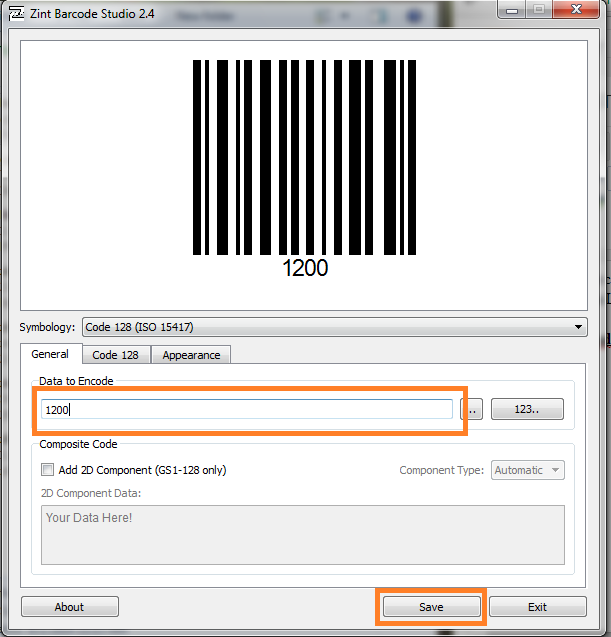
    Zint Barcode Generator Screenshot

    Generating One Barcode at a Time

    Open The Software and Type the Data To Be Encoded on Box. Then The Corresponding Barcode can be seen on the above box.

    Just Press The Save Button and Select The location to be saved.

    Generating A Large Number of Barcodes

    Zint Barcode Studio allows to generate a large number of barcodes with sequential values. For that, just select 123.. button.
    A new window will appear. Let’s understand this through an example. Let’s say I have to make barcodes for numbers 1-1000.
    Then the entries should be as follows.
    Start Value = 1
    End Value =1000
    Increment By  = 1.
    
    Format  = $$$$
    Format means, if you give $$$$ 
    then the values will be 0001, 0002 ... 1000.
    or if you give format as $$$$$, 
    then the values will be 00001,00002 ... 01000
    Press Create Button. Now You can see all the created barcode numbers on the ‘Sequence Preview’ Box
      • Click Import.
      • Select the Directory to be saved .
      • Done! Check the folder for barcodes

  • Library Assistant 4.0 – The Best Library Management Software For Free

    Library Assistant 4.0 – The Best Library Management Software For Free

    Library Assistant is a free Java based simple library management software developed mainly for schools and colleges. Library Assistant 4.0 comes with great features such as enhanced search, bar code support etc.

    Simple User Interface

    LA is designed for simplicity by hiding complex things from the user. You can issue a book by just 3 clicks or submit a book with just 2 clicks!

    Library Assistant Main Window

    BarCode Ready

    Library Assistant supports barcode readers. You can increase your library efficiency simply by making use of Bar code readers with LA.

    Barcode Support

    Run it Anywhere and Everywhere

    LA is platform independent. You can run it on your favorite Operating System. All that you need is the Java Runtime Environment installed.

    Full linux compatibility

    Keep Your Data Secure

    A username and password is required for logging in. You can set your username and password during initial configuration.

    Login Screen for LA

    Advanced Book Search

    You can search for a book by its Title, Author, Publisher, Book ID (Bar code Number) or even with its location on the library.
    Book search window
    Search Window

    Not Returned the Books Yet? Notify Them

    LA introducing a new email notification feature that send a notification email to the members with details regarding book issue and fine amount.
    Email Notification window
    Email Notification Window

    Track Members

    Library Assistant can keep of track of member’s each activity. So you can easily differentiate between active and inactive members. 


    Member profile window
    Member View

    Have an idea ? Let me know

    LA has been getting updated for last 3 years. If you want a particular feature to be added on to LA, let me know in the comments.

    Before downloading library assistant, your computer must have the Java Runtime Environment (JRE) installed. If it is not installed, please download the latest version from the below link.

    https://www.java.com/en/download/

    http://www.mediafire.com/download/4b783g8vk17hdsc/Library_Assistant_Linux.zip
    http://www.mediafire.com/download/6eql8ck1w7zqajt/Library_Assistant_Windows_5.zipKeywords: Library Management program for pc, Library Software, Library Assistant 4, Library Management Software, Library Program Java, Java Library Software, Library Management Software for Linux, Linux Library Software, simple library management system.