Category: Cpp

  • C++ Library Management Software with Source Code

    C++ Library Management Software with Source Code

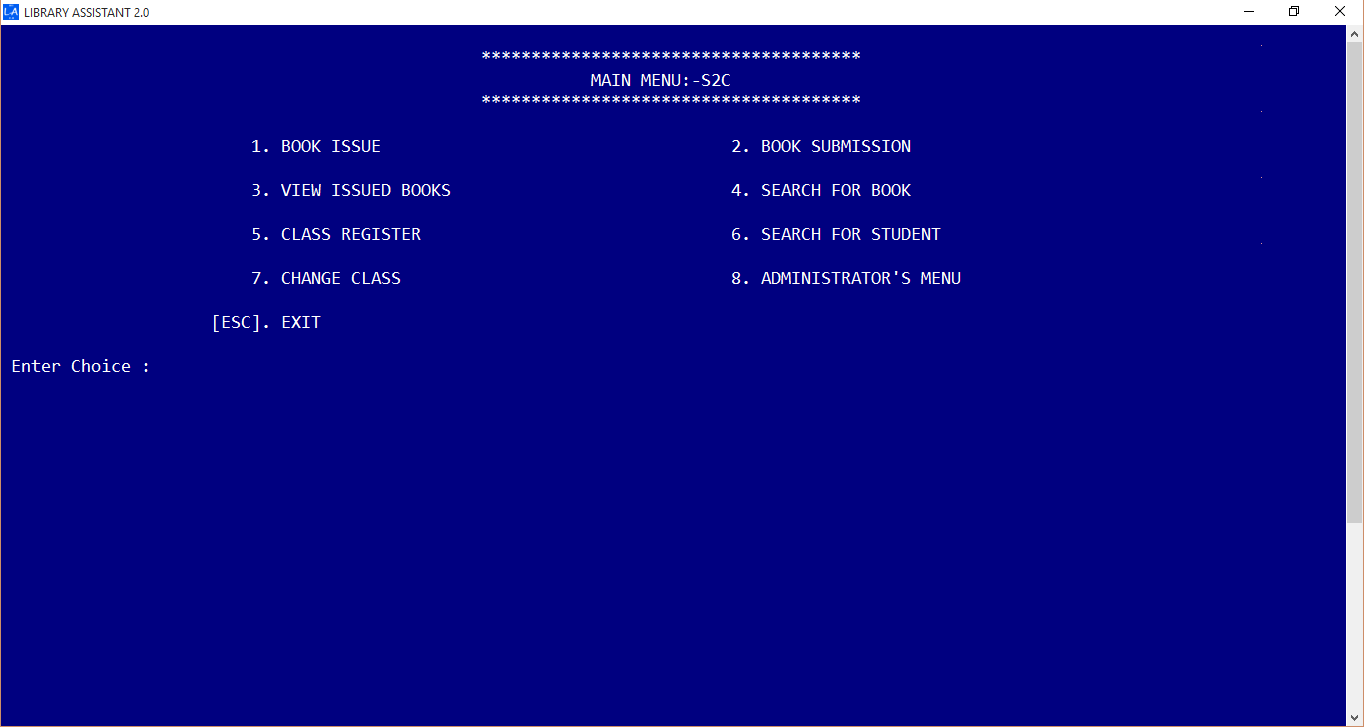
    Believe me, building a library management software in C++ is always a difficult thing. I have done library management software in java, c# and felt so much easiness in getting things done. Yet, this was my first library management software. Here I am going to share a simple library management program in C++ / Cpp as console application for schools and colleges. This program took me around 4 months to complete. The code is written as simple as possible. During the initial stage there were only just book issue and book submission modules. Later i have added more and more functions to improve Library Assistant. Thanks to Object Oriented Programming.

    Features

    Simple and easy User Interface
    Dasboard
    Ability to add and edit students, books
    Add New Student Window
    Dedicated Admin Panel
    Admin Panel
    Barcode Reader Support

    Bar code is supported for book issue and book submission process.

    Organize Members by their Class / Level
    Member Organization
    Library Overview Panel on Startup
    Library Overview
    Multithreaded book and member search
    Multithreaded Book Search
    Single-click Book Submission
    Easy to use book submission

    How to run the program ?

    1. Download the zip file from above link
    2. Run Library Management System.exe
    3. The default password is ‘PPM’ (case sensitive).
    4. Done !

    Read About Java Implementation of Library Software; Library Assistant 4

    Keywords : Library Management system c++ – Library Management software c++

  • C++ program to find the largest and second largest number present in an array

    C++ program to find the largest and second largest number present in an array

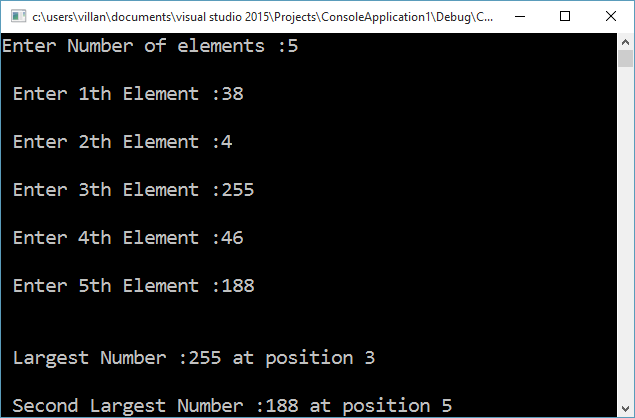
    C++ program to find the largest and second-largest numbers present in an array along with their location index on the array. This program first find the largest number by going through all the numbers in the array. It stores the index of the largest number on the variable pos1 and largest number is the largest variable. A second for loop is applied, which also check for the largest number. When it hits on the largest found by the first loop, it is bypassed using a continue statement and hence will get the second-largest number.

    #include <iostream>
    #include <conio.h>
    using namespace std;
    
    void main()
    {
    	int a[10], i, largest = 0, second_largest = 0, pos1, pos2;
    	int n;
    	cout << "Enter Number of elements :";
    	cin >> n;
    	for (i = 0; i < n; ++i)
    	{
    		cout << "n Enter " << (i + 1) << "th Element :";
    		cin >> a[i];
    	}
    	//Finding Largest
    	for (i = 0; i < 10; ++i)
    	{
    		if (a[i] > largest)
    		{
    			largest = a[i];
    			pos1 = i;
    		}
    	}
    	//finding second largset
    	for (i = 0; i < 10; ++i)
    	{
    		if (a[i] > second_largest)
    		{
    			if (a[i] == largest)
    				continue;	//Ignoring largest in order to get second largest
    			second_largest = a[i];
    			pos2 = i;
    		}
    	}
    	cout << "nn Largest Number :" << largest << " at position " << (pos1 + 1);
    	cout << "nn Second Largest Number :" << second_largest << " at position " << (pos2 + 1);
    
    	getch();
    	return;
    }
    

    *Compiled using Visual Studio

    OutputOutput of program to find the largest and second largest number present in an array

  • Using Barcode Reader for your C++ Program

    Using Barcode Reader for your C++ Program

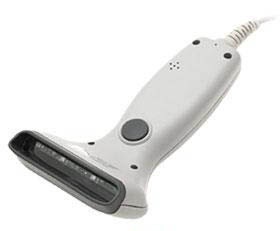
    As you might have heard, Bracode readers are special input devices for computers to read barcode. Barcode reader first scan the barcode using a light beam( usually a laser beam ) and analyze the width and distance between the bars. After successful scanning it convert the data into ASCII code which can be decoded by our computer. Simply we can say, a ps/2 barcode reader is same as that of a keyboard. Both generates the same ASCII code for representing an alphanumeric character. For more about ascii, read my article.

    A ps/2 barcode readrer is the simplest at the same time more efficient for general purposes. In C++ the header file iostream.h defines cin, cout commands for standard input and output operations respectively. As default, keyboard is the standard input device. Since our ps/2 barcode reader can act as an alternative keyboard by reading and sending ASCII codes to the computer, surely we can use our cin command for data input.

    I hope it is clear for you now. For further study, Let’s just analyze the below situation. Imagine you have a barcode containing data ‘1001’. When you scan it with barcode reader it generates a signal in ASCII code and send it to computer in the same way when you press ‘1001’ using your keyboard. The computer can’t distinguish from where the data came. So further processes can be programmed as our intentions.

    There are a lot of type barcode readers. For general purposes like supermarket, library programs, i recommend ps/2 barcode reader which can be used along with our keyboard. let’s just take a sample c++ program to read from barcode reader.

    #include<iostream>
    #include<conio.h>
    using namespace std;
    void main() {
      int a = 0;
      //Scan a barcode (simple barcode containing a number ). Don't use keyboard  
      cin >> a;
      if (a) {
        cout << "n Data Received !n" << "Barcode is :" << a;
      }
      return;
    }
    

    Suggested Read : The Quick Response Codes

  • ASCII Code for Characters in C++ program Source Code

    ASCII Code for Characters in C++ program Source Code

    In this tutorial, I would like to post a visual c++ console application source for a program that displays ASCII values as a table. It will be helpful in basic programming to detect the input character. You can compile this program using visual c++ or other compilers. ASCII is a set of special type of codes that will distinguish characters in computer memory. But because of its less capability for maintaining more characters and symbols, now it is replaced by UNICODE.

    C program to print ASCII code and corresponding character

    #include<iostream>
    
    using namespace std;
    
    void main() {
    
      char ch = '60';
      int counter = 60;
      while (counter < 137) {
        cout << "ASCII Code for " << ch << " is " << 'ch' << "n";
        ch++;
        ++counter;
      }
      system("pause");
      return;
    
    }
    

    ASCII Table and Description

    ASCII stands for American Standard Code for Information Interchange. Computers can only understand numbers, so an ASCII code is the numerical representation of a character such as ‘a’ or ‘@’ or an action of some sort. ASCII was developed a long time ago and now the non-printing characters are rarely used for their original purpose. Below is the ASCII character table, and this includes descriptions of the first 32 non-printing characters. ASCII was actually designed for use with teletypes and so the descriptions are somewhat obscure. If someone says they want your CV however in ASCII format, all this means is they want ‘plain’ text with no formatting such as tabs, bold or underscoring – the raw format that any computer can understand. This is usually so they can easily import the file into their own applications without issues. Notepad.exe creates ASCII text, or in MS Word you can save a file as ‘text only’

    ASCII Full Character Set

    Ascii Full Character Set

    Extended ASCII Codes

    Extended ASCII codes

  • GUI Simple Calculator Visual C++ Source : Windows Form Application

    GUI Simple Calculator Visual C++ Source : Windows Form Application

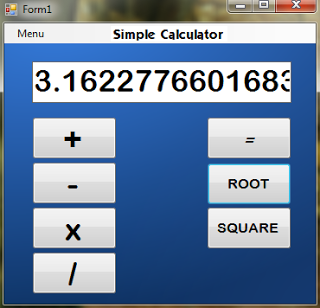
    Today let’s work around a new interesting visual C++ (cpp) calculator with Graphical User Interface (Windows Form Application). I made this source as easier as possible. You can compile the source by downloading the project source from below.

    Why is it simple calculator? It has only the basic functions of a calculator such as addition, subtraction, multiplication,division and 2 others. First Entered number is taken to the first variable a. Then select and operator, enter the second number. Do the necessary operations and When you press “=” equals button, you can see the answer right where you expect it.

    More than these basic operations, you can also find the square and square root of a number. I have added buttons for this. This program make use of “math.h” which contains “sqrt()” and “power()” functions for accomplishing these tasks.

    Visual Cpp Calculator

    Let me know your feedback in the comments.
    Use visual c++ 2010 compiler for execution.

                                                   Download Calculator Visual C++ Project

    Source……………………………Form1.h[design]

     #pragma once  
     #include<conio.h> //For_getch()_function  
     #include<math.h>  
     double ans, a, b;  
     int flag=0;  
     using namespace std;  
     namespace Calculator {  
         using namespace System;  
         using namespace System::ComponentModel;  
         using namespace System::Collections;  
         using namespace System::Windows::Forms;  
         using namespace System::Data;  
         using namespace System::Drawing;  
         /// <summary>  
         /// Summary for Form1  
         /// </summary>  
         public ref class Form1 : public System::Windows::Forms::Form  
         {  
         public:  
            Form1(void)  
            {  
                InitializeComponent();  
                //  
                //TODO: Add the constructor code here  
                //  
            }  
         protected:  
            /// <summary>  
            /// Clean up any resources being used.  
            /// </summary>  
            ~Form1()  
            {  
                if (components)  
                {  
                   delete components;  
                }  
            }  
         private: System::Windows::Forms::TextBox^ txtb;  
         private: System::Windows::Forms::Button^ button1;  
         private: System::Windows::Forms::Button^ button2;  
         private: System::Windows::Forms::Button^ button3;  
         private: System::Windows::Forms::Button^ button4;  
         private: System::Windows::Forms::Button^ button5;  
         private: System::Windows::Forms::Button^ button6;  
         private: System::Windows::Forms::Button^ button7;  
         private: System::Windows::Forms::Label^ label1;  
         private: System::Windows::Forms::MenuStrip^ menuStrip1;  
         private: System::Windows::Forms::ToolStripMenuItem^ menuToolStripMenuItem;  
         private: System::Windows::Forms::ToolStripMenuItem^ exitToolStripMenuItem;  
         protected:  
         protected:  
         protected:  
         private:  
            /// <summary>  
            /// Required designer variable.  
            /// </summary>  
            System::ComponentModel::Container ^components;  
     #pragma region Windows Form Designer generated code  
            /// <summary>  
            /// Required method for Designer support - do not modify  
            /// the contents of this method with the code editor.  
            /// </summary>  
            void InitializeComponent(void)  
            {  
                System::ComponentModel::ComponentResourceManager^ resources = (gcnew System::ComponentModel::ComponentResourceManager(Form1::typeid));  
                this->txtb = (gcnew System::Windows::Forms::TextBox());  
                this->button1 = (gcnew System::Windows::Forms::Button());  
                this->button2 = (gcnew System::Windows::Forms::Button());  
                this->button3 = (gcnew System::Windows::Forms::Button());  
                this->button4 = (gcnew System::Windows::Forms::Button());  
                this->button5 = (gcnew System::Windows::Forms::Button());  
                this->button6 = (gcnew System::Windows::Forms::Button());  
                this->button7 = (gcnew System::Windows::Forms::Button());  
                this->label1 = (gcnew System::Windows::Forms::Label());  
                this->menuStrip1 = (gcnew System::Windows::Forms::MenuStrip());  
                this->menuToolStripMenuItem = (gcnew System::Windows::Forms::ToolStripMenuItem());  
                this->exitToolStripMenuItem = (gcnew System::Windows::Forms::ToolStripMenuItem());  
                this->menuStrip1->SuspendLayout();  
                this->SuspendLayout();  
                //  
                // txtb  
                //  
                this->txtb->BackColor = System::Drawing::Color::White;  
                this->txtb->BorderStyle = System::Windows::Forms::BorderStyle::FixedSingle;  
                this->txtb->Font = (gcnew System::Drawing::Font(L"Arial Rounded MT Bold", 26.25F, System::Drawing::FontStyle::Regular, System::Drawing::GraphicsUnit::Point,  
                   static_cast<System::Byte>(0)));  
                this->txtb->ForeColor = System::Drawing::Color::Black;  
                this->txtb->Location = System::Drawing::Point(32, 44);  
                this->txtb->Margin = System::Windows::Forms::Padding(2, 3, 2, 3);  
                this->txtb->Name = L"txtb";  
                this->txtb->Size = System::Drawing::Size(300, 48);  
                this->txtb->TabIndex = 0;  
                this->txtb->TextAlign = System::Windows::Forms::HorizontalAlignment::Right;  
                this->txtb->WordWrap = false;  
                this->txtb->TextChanged += gcnew System::EventHandler(this, &Form1::txtb_TextChanged);  
                //  
                // button1  
                //  
                this->button1->Font = (gcnew System::Drawing::Font(L"Arial Rounded MT Bold", 27.75F, System::Drawing::FontStyle::Regular, System::Drawing::GraphicsUnit::Point,  
                   static_cast<System::Byte>(0)));  
                this->button1->Location = System::Drawing::Point(32, 108);  
                this->button1->Margin = System::Windows::Forms::Padding(2, 3, 2, 3);  
                this->button1->Name = L"button1";  
                this->button1->Size = System::Drawing::Size(98, 49);  
                this->button1->TabIndex = 1;  
                this->button1->Text = L"+";  
                this->button1->UseVisualStyleBackColor = true;  
                this->button1->Click += gcnew System::EventHandler(this, &Form1::button1_Click);  
                //  
                // button2  
                //  
                this->button2->Font = (gcnew System::Drawing::Font(L"Letterman-Solid", 15.75F, System::Drawing::FontStyle::Italic, System::Drawing::GraphicsUnit::Point,  
                   static_cast<System::Byte>(0)));  
                this->button2->Location = System::Drawing::Point(234, 108);  
                this->button2->Margin = System::Windows::Forms::Padding(2, 3, 2, 3);  
                this->button2->Name = L"button2";  
                this->button2->Size = System::Drawing::Size(98, 49);  
                this->button2->TabIndex = 2;  
                this->button2->Text = L"=";  
                this->button2->UseVisualStyleBackColor = true;  
                this->button2->Click += gcnew System::EventHandler(this, &Form1::button2_Click);  
                //  
                // button3  
                //  
                this->button3->Font = (gcnew System::Drawing::Font(L"Arial Rounded MT Bold", 27.75F, System::Drawing::FontStyle::Regular, System::Drawing::GraphicsUnit::Point,  
                   static_cast<System::Byte>(0)));  
                this->button3->Location = System::Drawing::Point(32, 160);  
                this->button3->Margin = System::Windows::Forms::Padding(2, 3, 2, 3);  
                this->button3->Name = L"button3";  
                this->button3->Size = System::Drawing::Size(98, 49);  
                this->button3->TabIndex = 3;  
                this->button3->Text = L"-";  
                this->button3->UseVisualStyleBackColor = true;  
                this->button3->Click += gcnew System::EventHandler(this, &Form1::button3_Click);  
                //  
                // button4  
                //  
                this->button4->Font = (gcnew System::Drawing::Font(L"Arial Rounded MT Bold", 27.75F, System::Drawing::FontStyle::Regular, System::Drawing::GraphicsUnit::Point,  
                   static_cast<System::Byte>(0)));  
                this->button4->Location = System::Drawing::Point(32, 212);  
                this->button4->Margin = System::Windows::Forms::Padding(2, 3, 2, 3);  
                this->button4->Name = L"button4";  
                this->button4->Size = System::Drawing::Size(98, 49);  
                this->button4->TabIndex = 4;  
                this->button4->Text = L"x";  
                this->button4->UseVisualStyleBackColor = true;  
                this->button4->Click += gcnew System::EventHandler(this, &Form1::button4_Click);  
                //  
                // button5  
                //  
                this->button5->Font = (gcnew System::Drawing::Font(L"Arial Rounded MT Bold", 27.75F, System::Drawing::FontStyle::Regular, System::Drawing::GraphicsUnit::Point,  
                   static_cast<System::Byte>(0)));  
                this->button5->Location = System::Drawing::Point(32, 264);  
                this->button5->Margin = System::Windows::Forms::Padding(2, 3, 2, 3);  
                this->button5->Name = L"button5";  
                this->button5->Size = System::Drawing::Size(98, 49);  
                this->button5->TabIndex = 5;  
                this->button5->Text = L"/";  
                this->button5->UseVisualStyleBackColor = true;  
                this->button5->Click += gcnew System::EventHandler(this, &Form1::button5_Click);  
                //  
                // button6  
                //  
                this->button6->Font = (gcnew System::Drawing::Font(L"Arial Rounded MT Bold", 12, System::Drawing::FontStyle::Regular, System::Drawing::GraphicsUnit::Point,  
                   static_cast<System::Byte>(0)));  
                this->button6->Location = System::Drawing::Point(234, 161);  
                this->button6->Margin = System::Windows::Forms::Padding(2, 3, 2, 3);  
                this->button6->Name = L"button6";  
                this->button6->Size = System::Drawing::Size(98, 49);  
                this->button6->TabIndex = 6;  
                this->button6->Text = L"ROOT";  
                this->button6->UseVisualStyleBackColor = true;  
                this->button6->Click += gcnew System::EventHandler(this, &Form1::button6_Click);  
                //  
                // button7  
                //  
                this->button7->Font = (gcnew System::Drawing::Font(L"Arial Rounded MT Bold", 12, System::Drawing::FontStyle::Regular, System::Drawing::GraphicsUnit::Point,  
                   static_cast<System::Byte>(0)));  
                this->button7->Location = System::Drawing::Point(234, 212);  
                this->button7->Margin = System::Windows::Forms::Padding(2, 3, 2, 3);  
                this->button7->Name = L"button7";  
                this->button7->Size = System::Drawing::Size(98, 49);  
                this->button7->TabIndex = 7;  
                this->button7->Text = L"SQUARE";  
                this->button7->UseVisualStyleBackColor = true;  
                this->button7->Click += gcnew System::EventHandler(this, &Form1::button7_Click);  
                //  
                // label1  
                //  
                this->label1->AutoSize = true;  
                this->label1->BackColor = System::Drawing::SystemColors::HighlightText;  
                this->label1->Font = (gcnew System::Drawing::Font(L"KabobExtrabold", 12, System::Drawing::FontStyle::Regular, System::Drawing::GraphicsUnit::Point,  
                   static_cast<System::Byte>(0)));  
                this->label1->Location = System::Drawing::Point(123, 3);  
                this->label1->Name = L"label1";  
                this->label1->Size = System::Drawing::Size(135, 18);  
                this->label1->TabIndex = 8;  
                this->label1->Text = L"Simple Calculator";  
                this->label1->Click += gcnew System::EventHandler(this, &Form1::label1_Click);  
                //  
                // menuStrip1  
                //  
                this->menuStrip1->Items->AddRange(gcnew cli::array< System::Windows::Forms::ToolStripItem^ >(1) {this->menuToolStripMenuItem});  
                this->menuStrip1->LayoutStyle = System::Windows::Forms::ToolStripLayoutStyle::Flow;  
                this->menuStrip1->Location = System::Drawing::Point(0, 0);  
                this->menuStrip1->Name = L"menuStrip1";  
                this->menuStrip1->Size = System::Drawing::Size(360, 23);  
                this->menuStrip1->TabIndex = 10;  
                this->menuStrip1->Text = L"menuStrip1";  
                this->menuStrip1->ItemClicked += gcnew System::Windows::Forms::ToolStripItemClickedEventHandler(this, &Form1::menuStrip1_ItemClicked);  
                //  
                // menuToolStripMenuItem  
                //  
                this->menuToolStripMenuItem->DropDownItems->AddRange(gcnew cli::array< System::Windows::Forms::ToolStripItem^ >(1) {this->exitToolStripMenuItem});  
                this->menuToolStripMenuItem->Name = L"menuToolStripMenuItem";  
                this->menuToolStripMenuItem->Size = System::Drawing::Size(50, 19);  
                this->menuToolStripMenuItem->Text = L"Menu";  
                this->menuToolStripMenuItem->Click += gcnew System::EventHandler(this, &Form1::menuToolStripMenuItem_Click);  
                //  
                // exitToolStripMenuItem  
                //  
                this->exitToolStripMenuItem->Name = L"exitToolStripMenuItem";  
                this->exitToolStripMenuItem->Size = System::Drawing::Size(92, 22);  
                this->exitToolStripMenuItem->Text = L"Exit";  
                this->exitToolStripMenuItem->Click += gcnew System::EventHandler(this, &Form1::exitToolStripMenuItem_Click);  
                //  
                // Form1  
                //  
                this->AutoScaleDimensions = System::Drawing::SizeF(6, 13);  
                this->AutoScaleMode = System::Windows::Forms::AutoScaleMode::Font;  
                this->BackgroundImage = (cli::safe_cast<System::Drawing::Image^ >(resources->GetObject(L"$this.BackgroundImage")));  
                this->BackgroundImageLayout = System::Windows::Forms::ImageLayout::Stretch;  
                this->ClientSize = System::Drawing::Size(360, 324);  
                this->Controls->Add(this->label1);  
                this->Controls->Add(this->button7);  
                this->Controls->Add(this->button6);  
                this->Controls->Add(this->button5);  
                this->Controls->Add(this->button4);  
                this->Controls->Add(this->button3);  
                this->Controls->Add(this->button2);  
                this->Controls->Add(this->button1);  
                this->Controls->Add(this->txtb);  
                this->Controls->Add(this->menuStrip1);  
                this->DoubleBuffered = true;  
                this->Font = (gcnew System::Drawing::Font(L"Microsoft Sans Serif", 8.25F, System::Drawing::FontStyle::Regular, System::Drawing::GraphicsUnit::Point,  
                   static_cast<System::Byte>(0)));  
                this->ForeColor = System::Drawing::Color::Black;  
                this->FormBorderStyle = System::Windows::Forms::FormBorderStyle::Fixed3D;  
                this->MainMenuStrip = this->menuStrip1;  
                this->Margin = System::Windows::Forms::Padding(2, 3, 2, 3);  
                this->Name = L"Form1";  
                this->Text = L"Form1";  
                this->Load += gcnew System::EventHandler(this, &Form1::Form1_Load);  
                this->menuStrip1->ResumeLayout(false);  
                this->menuStrip1->PerformLayout();  
                this->ResumeLayout(false);  
                this->PerformLayout();  
            }  
     #pragma endregion  
         private: System::Void txtb_TextChanged(System::Object^ sender, System::EventArgs^ e) {  
                   int temp;  
                          if(Int32::TryParse(txtb->Text, temp))  
                     a = float::Parse(txtb->Text);  
                }  
         private: System::Void button1_Click(System::Object^ sender, System::EventArgs^ e) {  
                   flag=1;  
                   b = double::Parse(txtb->Text);  
                   ans=a+b;  
                }  
     private: System::Void button3_Click(System::Object^ sender, System::EventArgs^ e) {  
                flag=2;  
                 b = float::Parse(txtb->Text);  
             }  
         private: System::Void button2_Click(System::Object^ sender, System::EventArgs^ e) {  
                   if(a==0 && b==0)  
                   {  
                       txtb->Text = "Enter Numbers";  
                   }  
                   if(flag==1)  
                   {  
                   ans=a+b;  
                       txtb->Text = Convert::ToString(ans);  
                   }  
                   else if(flag==2)  
                   {  
                      ans=b-a;  
                      txtb->Text = Convert::ToString(ans);  
                   }  
                   else if(flag==3)  
                   {  
                      ans=b*a;  
                      txtb->Text = Convert::ToString(ans);  
                   }  
                   else if(flag==4)  
                   {  
                      if(a==0)  
                      {  
                          MessageBox::Show("Divided By Zero Error");  
                      }  
                      ans=b/a;  
                      txtb->Text = Convert::ToString(ans);  
                   }  
                }  
     private: System::Void button4_Click(System::Object^ sender, System::EventArgs^ e) {  
                flag=3;  
                 b = double::Parse(txtb->Text);  
             }  
     private: System::Void button5_Click(System::Object^ sender, System::EventArgs^ e) {  
                flag=4;  
                b = double::Parse(txtb->Text);  
             }  
     private: System::Void button6_Click(System::Object^ sender, System::EventArgs^ e) {  
                ans=sqrt(a);  
                txtb->Text = Convert::ToString(ans);  
             }  
     private: System::Void button7_Click(System::Object^ sender, System::EventArgs^ e) {  
             ans=a*a;  
                txtb->Text = Convert::ToString(ans);  
             }  
     private: System::Void label1_Click(System::Object^ sender, System::EventArgs^ e) {  
                MessageBox::Show("Created By :nn Muhammed Afsal.vn e-mail : [email protected]");  
             }  
     private: System::Void button8_Click(System::Object^ sender, System::EventArgs^ e) {  
                a=b=0;  
             }  
     private: System::Void exitToolStripMenuItem_Click(System::Object^ sender, System::EventArgs^ e) {  
                Application::Exit();  
             }  
     private: System::Void menuStrip1_ItemClicked(System::Object^ sender, System::Windows::Forms::ToolStripItemClickedEventArgs^ e) {  
             }  
     private: System::Void menuToolStripMenuItem_Click(System::Object^ sender, System::EventArgs^ e) {  
             }  
     private: System::Void Form1_Load(System::Object^ sender, System::EventArgs^ e) {  
             }  
     };  
     }  
    ———————————-Calculator.cpp
    // Calculator.cpp : main project file.  
     #include "stdafx.h"  
     #include "Form1.h"  
     using namespace Calculator;  
     [STAThreadAttribute]  
     int main(array<System::String ^> ^args)  
     {  
         // Enabling Windows XP visual effects before any controls are created  
         Application::EnableVisualStyles();  
         Application::SetCompatibleTextRenderingDefault(false);  
         // Create the main window and run it  
         Application::Run(gcnew Form1());  
         return 0;  
     }  
     ———————————————————————————————————-
                                                                   Download Project

    Screen Shots :-

    Screen_Shot_2
  • Energy – mass Converter program c++ (cpp) source

    Energy – mass Converter program c++ (cpp) source

    This is a Simple C++ code for a converter program that converts energy into mass according to the famous equation from greatest scientist Albert Einstein. E= MC2
    Input energy in MeV( Mega electron volt), GeV( Giga electron volt) or in  Tev( Tera electron volt).
    You can use visual c++ compiler for compiling and running program. You can find the Source code below. if you are using Borland turbo C++ don’t use “using namespace std;” and insert .h extension for iostream, iomanip header files. Moreover, it will not support  “system(“CLS”);” and replace it by “clrscr();”
     
    E= MC2: –
    E = Energy
    M = Mass
    C = speed of light in vacuum (299792458 m/s)
    Let’s imagine the practical use of this equation. Consider just a stone, which weigh 250g. If you convert it completely into energy, then the total energy from the mass;
    E = 0.250(kg) x 89875517873681764 (c x c)
       = 22468879468420441 J
    #include<iostream>
    #include<Windows.h>//for_sleep()
    #include<iomanip>
    #include<process.h>  //for_exit()_function;
    #include<conio.h>
        using namespacestd; 
    void main()
    {   system(“color f1”);   //making_colour_combinations
           double consteV=1.60219e-19;
           double constc2=9*10e16;   //c^2;
           int ch;   //for_input
           double e, mass;
           start:    //For_returning_into_main_menu
        system(“CLS”);
           cout<<“tt***********************************************n”;
           cout<<“tt   ENERGY – MASS CONVERTER : UNIT CHOICE MENUn”;
           cout<<“tt***********************************************n”;
           cout<<“nn 1. MeV (Mega Electrone Volts)n 2. GeV (Giga electrone volts)n 3. TeV (Tera Electrone Volts) n 4. Exit”;
           cout<<“nn Please Enter Your Choice :”;
           cin>>ch;
           system(“CLS”);    //Clear_screen_command
           switch(ch)
            {
                  case 1:
                             cout<<“ntt     ENERGY-MASS CONVERTER ( E = mc^2 )”;
                             cout<<“nnnnPlease enter energy in MeV :”;
                             cin>>e;
                             e=e*10e6*eV;          // Energy Converted into Joules
                             mass=e/c2;
                             cout<<“nnntttMass = “<<setprecision(10)<<mass<<” Kilograms”;
                                 break;
                  case 2:
                            cout<<“tttENERGY-MASS CONVERTER ( E = mc^2 )”;
                            cout<<“nnnnPlease enter energy in GeV :”;
                            cin>>e;
                            e=e*10e9*eV;          // Energy Converted into Joules
                            mass=e/c2;
                            cout<<“nnntttMass = “<<setprecision(10)<<mass<<” Kilograms”;
                                 break;
                  case 3:
                             cout<<“tttENERGY-MASS CONVERTER ( E = mc^2 )”;
                             cout<<“nnnnPlease enter energy in TeV :”;
                             cin>>e;
                             e=e*10e12*eV;          // Energy Converted into Joules
                             mass=e/c2;
                             cout<<“nnntttMass = “<<setprecision(10)<<mass<<” Kilograms”;
                                 break;
                  case 4 : system(“CLS”);
                              cout<<“nnttttThank you………..”;
                                Sleep(1000);
                                exit(0);
                  default: cout<<“naInvalid Choice !….nnPlease Try again.”;
                                      break;
            }                                              // End of switch
           if(_getch())       //wait_for_any_input_through_keyboard
             goto start;
    return;
    }
    ____________________________________________________________
  • Student Record C++(cpp) Source Code Windows Console Application

    Student Record C++(cpp) Source Code Windows Console Application

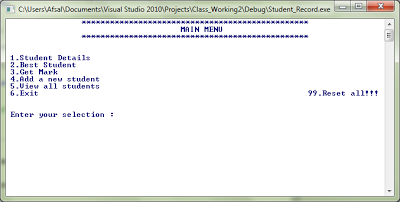
    Let’s have a look at C++ source code for a student record program developed for windows console mode. You can test this code using Microsoft visual C++ compiler without any issues. I believe this sample code will help you to understand some of the basic C++ functions.
    This is a menu driven program. You can add a student, get a student’s mark by entering his roll number, get a student’s details or print a table of all student’s details. This program creates a “student.dat” file at the current directory (The path at which the executable located) to save details that you have entered. During the next execution of the program the data present in the file is taken in to the memory. For deleting all existing data, you can use ’99’ command in main menu. It just delete existing file and create a new one having no records, simply a blank file.

    ……………………………………………………………………………………………………………………………………….

    #include<iostream>
    #include<windows.h> //for_sleep()_function
    #include<iomanip> // for_setwidth_function
    #include<fstream>
    #include<process.h> //For_exit(0)
    #include<conio.h>  //for_getch()
    #include<string.h>
    #include<stdio.h> //for_gets()
      int k=0, sys, str,high=60;   //For_student_object_handling
      using namespace std;
    class person
    {
    protected:
    
           char sex;
    
           int age;
    
           int count;
    
           char name[50];
    
    public:
    
           int length;
    
           void readperson()
    
           {
    
                  system("CLS");
    
               cout<<"tt************************************************";
    
               cout<<"nttttADD A NEW STUDENT ";
    
               cout<<"ntt************************************************";
    
                  cout<<"nn Good name please (Don't Use space; use '_') :";
    
                  cin>>name;
    
                  cout<<"n Please Enter your age :";
    
                  cin>>age;
    
                  cout<<"n Sex ? (M/F) :";
    
                  cin>>sex;
    
           }
    
    };
    
    class student:public person     //This_class_student_is_inherited_from_class_person.
    
    {
    
    protected:
    
           int roll;
    
           int avmark;
    
    public:
    
      void readstudent()
    
      {
    
             cout<<"nn Enter your Roll Number :";cin>>roll;
    
             cout<<"n Enter Your Average Mark( Out of hundred ) :";cin>>avmark;
    
      }
    
      int getroll()           
    
      {
    
             return(roll);
    
      }
    
      void getdetails()
    
      {
    
             cout<<"nn Name  :"<<name;
    
             cout<<"n Sex   :"<<sex;
    
             cout<<"n Age   :"<<age;
    
             cout<<"n Roll  :"<<roll;
    
             cout<<"n Mark  :"<<avmark;
    
      }
    
      void GetDetailsTable() //For_making_table_arrangement_of_students;
    
      {    high--;
    
              if(str<=7)          //For_maintaining_the_exact_form; One_extra_t_is_used_after_name;
    
                  cout<<"ntt"<<name<<"tt"<<sex<<"t"<<age<<"t"<<roll<<"t"<<avmark<<"n";
    
              else
    
               cout<<"ntt"<<name<<"t"<<sex<<"t"<<age<<"t"<<roll<<"t"<<avmark<<"n";
    
     }
    
      int getmark()
    
      {
    
             return(avmark);
    
      }
    
      void prtname()
    
      {
    
             cout<<name;
    
      }
    
      char GetSex()
    
      {
    
             return sex;
    
      }
    
    
    }stu[61];// Class_Defnition_completed
    
    
    void main()        //Beggining_main_function_HERE
    
    
    {  
    
           void SortBySex();
    
           void SortItOnMark();
    
           void SortItOnRoll() ;
    
           ofstream fout;
    
           ifstream fin;
    
           start:                    //For_returning_into_main_menu
    
           fin.close();
    
           fout.close();
    
           fin.open("student.dat", ios::app|ios::binary|ios::in);
    
           int num=0; //Making_input_buffer_zero_after_function_returning_through_start:
    
           while(fin) // Taking Student details into memory
    
           {     
    
               fin.read((char *)&stu[num], sizeof(stu[num]));
    
                  ++num;
    
           }
    
                        //File_input_completed !
    
           sys=num-1;
    
           int p1=100, p2=50;
    
           system("color f1");
    
           int k, Ru, rank(0), rankm(0);
    
           system("CLS");
    
           cout<<"tt************************************************";
    
           cout<<setw(62)<<"MAIN MENU";
    
           cout<<"ntt************************************************";
    
           cout<<"nnn 1.Student Details"<<"n 2.Best Student"<<"n 3.Get Mark"<<"n 4.Add a new student"<<"n 5.View all students"<<"n 6.Exittttttttt99.Reset all!!!"<<"nnn Enter your selection :";
    
           cin>>k;
    
           switch(k)
    
           {  //switch_starts
    
           case 1:system("cls");
    
                  int flag;
    
                  flag=0;
    
               cout<<"tt************************************************";
    
               cout<<"nttttSTUDENT DETAILS";
    
               cout<<"ntt************************************************";
    
                  cout<<"nnEnter Roll Number :";
    
                     cin>>Ru;
    
                     for (int i=0; i<60;++i)
    
                     {
    
                     if (stu[i].getroll()==Ru)
    
                               {
    
                                      flag=1;
    
                                      stu[i].getdetails();
    
                             }
    
                     }
    
                         if (!flag)
    
                         cout<<"nnnnSorry...I cannot find a student with this roll number !";
    
                      cout<<"nnnnnPress Any key.............";
    
                         if(_getch())
    
                          goto start;


           case 2:system("cls");
    
                  cout<<"tt************************************************";
    
               cout<<"nttttTHE BEST STUDENT ";
    
               cout<<"ntt************************************************";
    
                  cout<<"nn Best Student is :";
    
                     for (int i=0; i<60; ++i)
    
                     {


                            if (stu[i].getmark()>rankm)
    
                            {
    
                                  rankm=stu[i].getmark();
    
                                  rank=i;
    
                            }
    
                     }
    
                     stu[rank].getdetails();
    
                     cout<<"nnnnnPress Any key.............";
    
                         if(_getch())
    
                          goto start;
    
           case 3:system("cls");
    
                  flag=1;
    
               cout<<"tt************************************************";
    
               cout<<"nttttGET THE MARK ";
    
               cout<<"ntt************************************************";
    
                  cout<<"nnnPlease Enter Roll Number :";
    
                  cin>>Ru;
    
                     for (int i=0; i<60;++i)
    
                     {
    
                            if (stu[i].getroll()==Ru)
    
                               {
    
                                      flag=0;
    
                                      cout<<"nnn Mark of ";stu[i].prtname();cout<<" is "<<stu[i].getmark();
    
                             }
    
                     }
    
                     if(flag)
    
                             cout<<"nnttSorry....No Such students; Try again !";               
    
               if(_getch())   //wait_for_any_input_via_keyboard
    
                      goto start;
    
                  break;
    
           case 4:               //Add_student_menu
    
                     stu[k].readperson();
    
                     stu[k].readstudent();
    
                         fout.open("student.dat", ios::out|ios::binary|ios::app);
    
                         fout.write((char*)&stu[k], sizeof(student));
    
                         cout<<"nnntttFile saving accomplsihed !Please Restart this program ";
    
                      fout.close();
    
                         fin.close();
    
                         cout<<"nnnnnn";
    
                         Sleep(2500);
    
                         goto start;


                         break;
    
           case 5:   // View_all_students_table
    
                  system("CLS");
    
                  int count, selection;
    
                  char answer;
    
                  answer='n';
    
                  count=0;
    
                  cout<<sys;
    
                  cout<<"tt************************************************";
    
               cout<<"nttNamettSextAgetRolltMarkn";
    
               cout<<"tt************************************************";
    
                  while (count<sys)
    
                  {
    
                         stu[count].GetDetailsTable();
    
                   count++;
    
                  }
    
                  cout<<"nnttDo you want to sort it now ? (y/n) :";
    
                  cin>>answer;
    
                  if(answer=='y'||answer=='Y')
    
          {     
    
                         cout<<"n Sort By :nt1. Marknttt2.Rollnttttt3.By Sexnn";
    
                      cout<<"Enter :";
    
                         cin>>selection;
    
                    switch(selection)
    
                      {
    
                     case 1: SortItOnMark();break;
    
                        case 2: SortItOnRoll();break;
    
                        case 3: SortBySex();break;
    
                      default :cout<<"nBad Input !";
    
                      }
    
                  }
    
                  else
    
                         goto start;
    
               cout<<"nnnn";system("pause");
    
                  goto start;
    
           case 6 : //Exit_Function
    
                  system("CLS");
    
                  fin.close();
    
                  fout.close();
    
                  cout<<"nnnttt BYE !!!!!!!!!!!!!!!!!!!!!";
    
                  Sleep(1000);   //wait_1_second_before_exiting
    
                  exit(0);
    
                  break;
    
    
    case 99 :
    
                   // File-reset_option_begins
    
                  char ans;
    
                  system("CLS");
    
                  cout<<" You have choosen to delete all the user data from this program !.nnCaution :You cannot back up your data !nnFor further reference make a copy of file (student.dat) from source folder !";
    
                  cout<<"nn Are you sure want to erase all (y/n)? :";
    
                  cin>>ans;
    
                  if (ans=='y'||ans=='Y')
    
                  {
    
            ofstream fout;
    
                  fout.open("student.dat", ios::out,ios::binary);
    
                  cout<<"nnna"<<"taa Task accomplished Successfully !";
    
                  }
    
                  else
    
                         cout<<"nn"<<"atTask aborted, Now returning to main menu";
    
                      Sleep(2500);
    
                         goto start;
    
                  //File_reset_accomplished 
    
    
           default : system("CLS");
    
                        cout<<"annntttBad input Recieved ! Try Again";
    
                        Sleep(1000);
    
                           goto start;
    
                           break;
    
    
    } //switch ended


    return;
    
    
    } // Main()_over
    
    
    void SortItOnRoll()   //Student_Details_table_sorted_on_mark
    
    {  
    
           high=60;
    
        int car=sys;
    
           cout<<"tt************************************************";
    
           cout<<"nttNamettSextAgetRolltMarkn";
    
           cout<<"tt************************************************n";
    
           int first=0, place;
    
           while(car)
    
           {first=0;
    
           for(int t=0; t<(high); ++t)
    
           {
    
                  if(first<=stu[t].getroll())
    
                  {
    
                         first=stu[t].getroll();
    
                      place=t;
    
                  }
    
           }
    
           stu[place].GetDetailsTable();
    
           stu[place]=stu[high];
    
           car--;
    
       }
    
    }          //Function_completed
    
    void SortItOnMark()   //Student_Details_table_sorted_on_mark
    
    {  
    
           high=60;
    
        int car=sys;
    
           cout<<"tt************************************************";
    
           cout<<"nttNamettSextAgetRolltMarkn";
    
           cout<<"tt************************************************n";
    
           int first=0, place;
    
           while(car)
    
           {first=0;
    
           for(int t=0; t<(high); ++t)
    
           {
    
                  if(first<=stu[t].getmark())
    
                  {
    
                         first=stu[t].getmark();
    
                      place=t;
    
                  }
    
           }
    
           stu[place].GetDetailsTable();
    
           stu[place]=stu[high];
    
           car--;
    
       }
    
    }          //Function_completed
    
    
    void SortBySex()   //Student_Details_table_sorted_on_Sex
    
    {  
    
           high=60;
    
        int car=sys;
    
           cout<<"tt************************************************";
    
           cout<<"nttNamettSextAgetRolltMarkn";
    
           cout<<"tt************************************************n";
    
           for(int t=0; t<sys; ++t)
    
           {
    
                  if(stu[t].GetSex()=='f'||stu[t].GetSex()=='F')
    
                  {
    
                         stu[t].GetDetailsTable();
    
                  }
    
                  else continue;
    
           }
    
           cout<<endl;
    
           for(int t=0; t<sys; ++t)
    
           {
    
                  if(stu[t].GetSex()=='m'||stu[t].GetSex()=='M')
    
                  {
    
                         stu[t].GetDetailsTable();
    
                  }
    
                  else continue;
    
           }
    
    
    }          //Function_completed
    ………………………………………………………………………………………………………………………………………………

    Download Source Now

    Screenshots

    MENU
    Student Table

    Suggested Read : C++ Library Management Program with Source Code