Tag: Barcode

  • Java Barcode Generator Program with Source Code

    Java Barcode Generator Program with Source Code

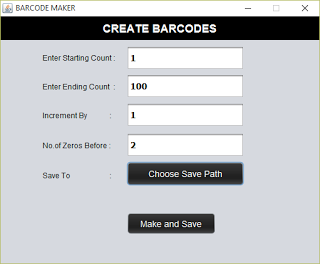
    We deal with barcodes every day. Compared to QR codes or Quick Response codes, it is simple to generate, read using a barcode reader. This is a java application that uses ‘barcode4j’ library to generate barcodes. Barcode Maker allows to create large number of barcodes between specified ranges. It basically reads the starting count, make the barcode and save to specified location. Then increments the number by the given increment interval, make and save. This is repeated until the end count given reached.

    Inputs

    Starting Count
    From which number the barcode is to be generated. Type 0 to start from 0
    Ending Count
    Up to what number the barcode is to be generated. Say 100
    Increment by
    Next barcode to be generated is found using the formula Starting Count + Increment by
    No of zeros before
    Will help to adjust the barcode width for smaller number like 0 and 1. If you are generating barcodes from 0-1000 then starting barcodes will be very small in width. This can be fixed by adding no of zeros before the number. Say 2
    Save to
    Choose where you want to save the generated barcodes

    Download

    Screenshots

    Main Window of Barcode Make with Sample Input
    Barcode Creating Completed
    Progress monitor
    Created barcodes

    You might also be interested in:-

    Keywords : Java Barcode Creator Software with Source Code , Barcode Generator
  • How to Create Barcodes as Batches (Bulk creation)

    How to Create Barcodes as Batches (Bulk creation)

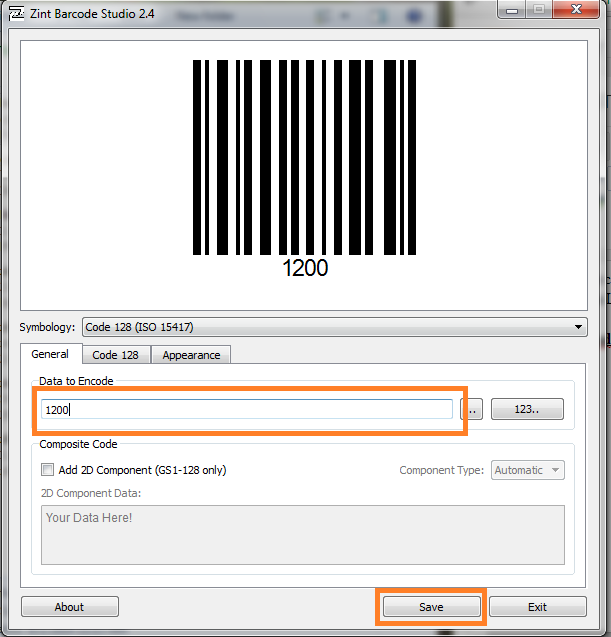
    You can create barcodes for any alphanumeric combination using Zint Barcode Generator. Download Zint Barcode Studio From http://sourceforge.net/projects/zint/. It is available for both windows and Linux.
    Zint Barcode Generator Screenshot

    Generating One Barcode at a Time

    Open The Software and Type the Data To Be Encoded on Box. Then The Corresponding Barcode can be seen on the above box.

    Just Press The Save Button and Select The location to be saved.

    Generating A Large Number of Barcodes

    Zint Barcode Studio allows to generate a large number of barcodes with sequential values. For that, just select 123.. button.
    A new window will appear. Let’s understand this through an example. Let’s say I have to make barcodes for numbers 1-1000.
    Then the entries should be as follows.
    Start Value = 1
    End Value =1000
    Increment By  = 1.
    
    Format  = $$$$
    Format means, if you give $$$$ 
    then the values will be 0001, 0002 ... 1000.
    or if you give format as $$$$$, 
    then the values will be 00001,00002 ... 01000
    Press Create Button. Now You can see all the created barcode numbers on the ‘Sequence Preview’ Box
      • Click Import.
      • Select the Directory to be saved .
      • Done! Check the folder for barcodes