
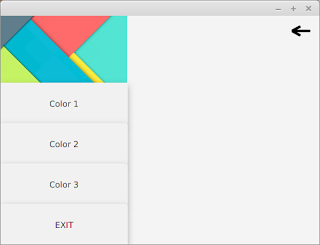
Navigation drawer provides an intuitive way to keep main navigation controls of the UI clean. The drawer will only be made visible to the user on certain actions like button click so that we can make use of that space for much more important things yet keeping controls reachable with single click.
Android introduced the material design Navigation bar or side pane or whatever you call, with its Material design goodness. JFoenix library provides JFXDrawer component.
Today, I will be showing how to implement the Navigation drawer on your JavaFX application using JFoenix material design library. If you want some help on setting up the JFoenix material design library, see my post JavaFX Material Design : Setting Up and Making Login Application.
I have made a video to make things more clear. You can watch it right here.

If you are the kind of person who do not like to watch tutorial videos, read from here. I will explain it step by step.
Step 1 : Design Content For Navigation Drawer

VBox box = FXMLLoader.load(getClass().getResource("SidePanelContent.fxml");
Step 2 : Design The Container (Main) Window

Now we have the navigation bar content. In this step, you have to design the main application window. The JFXDrawer can be added using scene builder by drag and drop. Once you position the drawer on the space you want, you can set the drawer direction to LEFT, RIGHT, TOP or BOTTOM from the Properties section of Scene Builder.
@FXML
//Accessing FXML Element
JFXDrawer drawer;
//Add this in ActionListener
if(drawer.isShown())
drawer.close();
else
drawer.open();
The navigation drawer can be made visible by using the open() method. It can be made invisible through the function call close().
Step 3 : Setting the content of Drawer
Now we have two separate components. The Drawer and Main window. We can attach the box loaded in step 1 to our drawer in main window using the following code.
drawer.setSidePane(box);
Step 4 : There is no 4th step. You are done !
Recently, as part of library management software tutorial, I have created more elaborate tutorial about creating Navigation Drawer. It contains more complex buttons with icons and CSS styling. Watch those tutorial videos from the following link.
Get Project From GitHub
You might also be interested in:-
- JavaFX Library Management System Development: https://genuinecoder.com/javafx-complete-project-tutorial-library-management-system-html/
- JavaFX Animation Tutorial: https://genuinecoder.com/javafx-animation-tutorial/
- JavaFX 3D Tutorial: https://genuinecoder.com/javafx-3d-tutorial-introduction/


Leave a Reply Cancel reply
You must be logged in to post a comment.